How it works
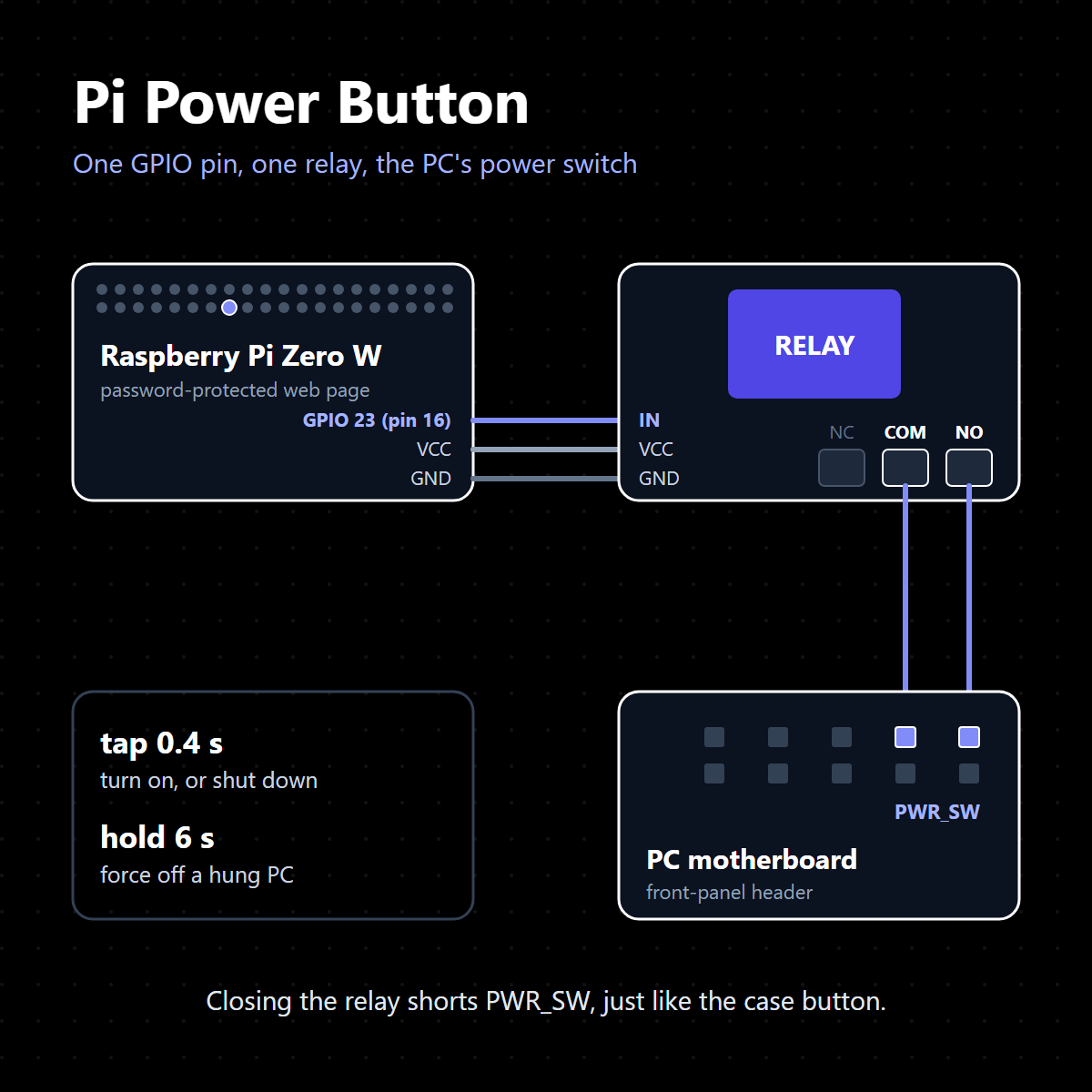
A Raspberry Pi Zero W sits next to my PC. One of its GPIO pins drives a relay module, and the relay's
contacts are wired across the two PWR_SW pins on the motherboard's front-panel header, the
same two pins the case's power button connects to. When the relay closes, the motherboard sees exactly
what it would see if someone pressed the button. Everything else (the web page, the schedules, the
status) is one Python program on the Pi that uses nothing but the standard library.
-
Phone
web app, Siri Shortcut or widget
-
My server
Apache reverse proxy
-
Pi Zero W
Python web server
-
Relay
closes for 0.4 s or 6 s
-
PC
turns on or off
Pressing the button with a relay
A motherboard's power input is a momentary switch: briefly connecting the two PWR_SW pins
tells it to act, and how long they stay connected decides what it does. A relay is a good fit because
the Pi never touches the PC's circuitry. The Pi only switches the relay's input, and the PC only sees a
pair of contacts close, so the two machines stay electrically separate.
The relay's input is wired to GPIO 23 (physical pin 16). The server drives the pin with
raspi-gpio, or pinctrl on newer Raspberry Pi OS images:
- Press:
raspi-gpio set 23 op(make it an output, only if it isn't one already), thenraspi-gpio set 23 dhto drive it high, which closes the relay. - Release:
raspi-gpio set 23 dldrives it low and the relay opens.
Every action is a timed pulse. The release sits in a finally block, so the relay
always opens again even if something goes wrong mid-press:
def pulse(self, seconds):
    """Hold the switch for a fixed time, releasing even if something goes wrong."""
    self.press()
    try:
        time.sleep(max(0.05, float(seconds)))
    finally:
        self.release()
As a second safety net, a background thread checks once a second whether the pin has been held for longer than 30 seconds (which can happen with the manual hold button on the page) and releases it if so. Only one power action can run at a time, so two taps can't overlap and accidentally become a long hold.
Turning the PC on and off
The same relay does every job. Only the length of the press changes:
| Action | Press | What the PC does |
|---|---|---|
| Turn on | 0.4 s tap | From off, the power supply starts and the PC boots. From sleep, it wakes up. |
| Shut down | 0.4 s tap | While Windows is running, a short press is an ACPI power-button event, and Windows does whatever its power button is set to do, which by default is a clean shutdown. |
| Force off | 6 s hold | Holding the switch for more than about 4 seconds makes the motherboard cut the power no matter what the OS is doing. This is the fix for a frozen PC. |
| Wake | no press | A Wake-on-LAN magic packet (6 × 0xFF followed by the MAC address 16 times), sent to the broadcast addresses and the PC. It's an alternative to the tap when the PC is asleep. |
Because "turn on" and "shut down" are the same tap, pressing it blind would be risky: the page has to know whether the PC is already on before it does anything. That's what the next part is for.
Knowing whether it worked
Every five seconds the Pi checks the PC over the local network:
- Off: nothing answers at its address.
- Asleep: the network card answers ARP but the PC doesn't answer ping. With Wake-on-LAN enabled, Windows leaves the card listening while it sleeps.
- On: it answers ping.
- Ready: a TCP connection to a port Windows itself listens on (Remote Desktop, file sharing and similar) succeeds, so Windows has actually finished booting, not just the network card.
The ARP and ICMP checks use raw sockets. Instead of running the server as root, systemd gives it only
the CAP_NET_RAW capability. If the PC's IP address changes, the Pi finds it again by its
MAC address.
After a press, the action stays open until the PC reaches the state it should be in, or until a timeout (4 minutes for turning on, 1 minute for forcing off) says it didn't. A successful boot ends with something like "Ready after 41 s (pinging after 12 s)", and those times go into a history of boots and power-on hours. A timeout ends with a reason, for example "Check the switch wiring" or "Windows may be asking about unsaved work".
The other half: a helper on the PC
The relay can only press the button. For everything that has to happen inside Windows (sleep, hibernate, restart, lock, a clean shutdown with no button at all), a small PowerShell script runs hidden on the PC. It only ever connects out to the Pi: every few seconds it reports who is logged in, how long the PC has been idle, and CPU, GPU and memory load, and it waits for commands. This also makes auto-off possible: once nobody has touched the PC for two hours, nothing like a film is keeping the screen on, and the CPU and GPU are quiet, the Pi tells Windows to shut down.
Reaching it from outside the house
The Pi is on home Wi-Fi behind the router, so nothing reaches it directly. Instead it keeps a reverse SSH tunnel open to my server. Apache there has a subdomain with a Let's Encrypt certificate and passes its requests down the tunnel to the Pi. The tunnel's SSH key is locked down on the server so it can only open those forwards, with no shell. The page itself needs a password (stored as a PBKDF2 hash), logins are kept in signed cookies, and Siri Shortcuts and home-screen widgets use API tokens that can be revoked individually.
Keeping a Pi Zero online
The Zero W's Wi-Fi was the weakest link, so the installer turns off Wi-Fi power saving (the chip drops
off the network with it on), adds a watchdog that reconnects Wi-Fi when the router disappears, and turns
on the hardware watchdog: systemd checks in with /dev/watchdog every 7 seconds, and if the
Pi ever hangs it reboots itself after 14. History is written to the SD card in batches rather than
on every change, to save wear on the card.
Built with
Python 3 (standard library only: http.server, raw sockets, hashlib),
raspi-gpio, systemd, a vanilla JavaScript web app that can be installed on a phone's home
screen, PowerShell, OpenSSH and Apache.